
Insurance Premium Not Calculating on an Insured File
The insurance premium on an insured mortgage may not calculate if the application does not meet the insurer’s minimum down payment requirements. This article explains how to identify a down payment issue using the validation tool, correct the down payment, and confirm the insurance premium is added to the loan amount.
If an application is marked as insured, but the mortgage insurance premium is not being added to the loan amount, the file may not meet the insurer's minimum down payment requirements.
The down payment must meet the insurer's minimum requirements before Scarlett can calculate the mortgage insurance premium.
What You May See
You may notice that:
The Insured box is checked.
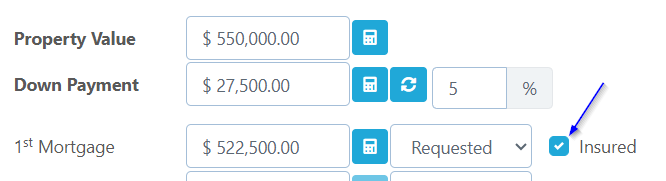
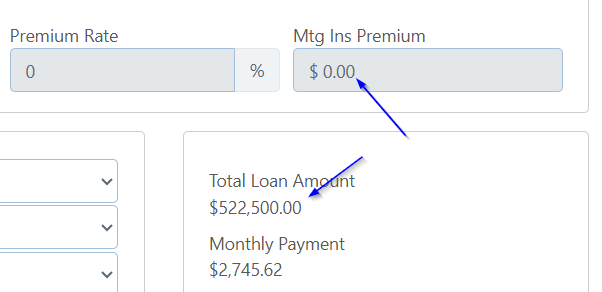
No insurance premium is being calculated and no override is setting it to 0%.

The expected premium is not being added to the total loan amount.
Steps to Fix the Issue
1. Validate the Deal
Select the Validate button.
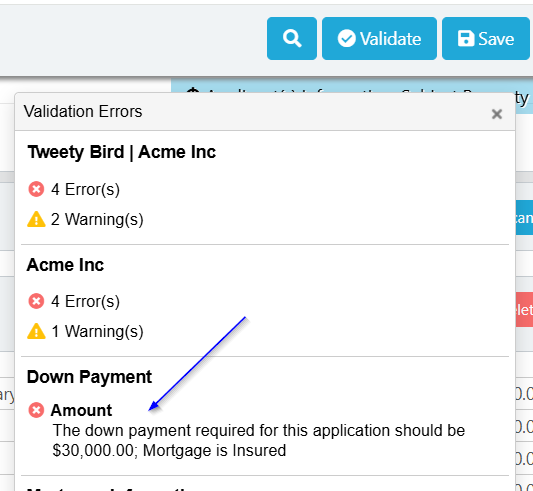
Review the validation results for a warning related to the minimum required down payment. Scarlett may indicate the amount of down payment required for the application.
2. Correct the down payment
Update the down payment to meet or exceed the amount identified by Scarlett.
In the example above, the down payment would need to be increased to $30,000.
Save the application after making the change so Scarlett can recalculate the mortgage details.
3. Confirm the insurance premium
After saving, return to the mortgage details and confirm that:
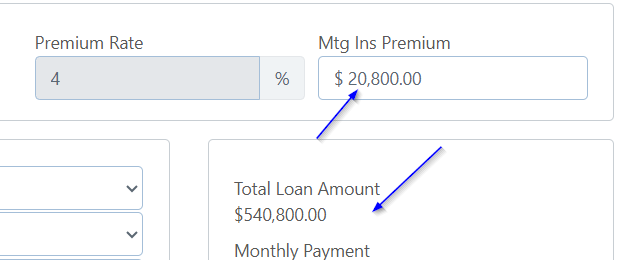
The insurance premium is now displayed.
The premium has been added to the loan amount.
No remaining validation warnings indicate an insufficient down payment.
If the Premium Still Does Not Appear
If the insurance premium is still missing after the down payment has been corrected:
Confirm the Insured box is still checked.
Confirm the down payment meets the amount required.
Save the application again and allow the mortgage calculation to refresh.
Review any remaining validation or calculation warnings.
If the file meets the insurer requirements and the premium still does not calculate, contact Scarlett Support for further investigation.